


Knowledge loss
Expert know-how lives in people’s heads. When they move on, it leaves with them.
AI documentation and 3D work instructions
Draft manuals from your PDFs and engineering data, and add a 3D model for visual work instructions. When a part changes, see every page it touches. Your experts approve every release. Share it publicly or keep it private.
Free plan · No credit card · Open a live example
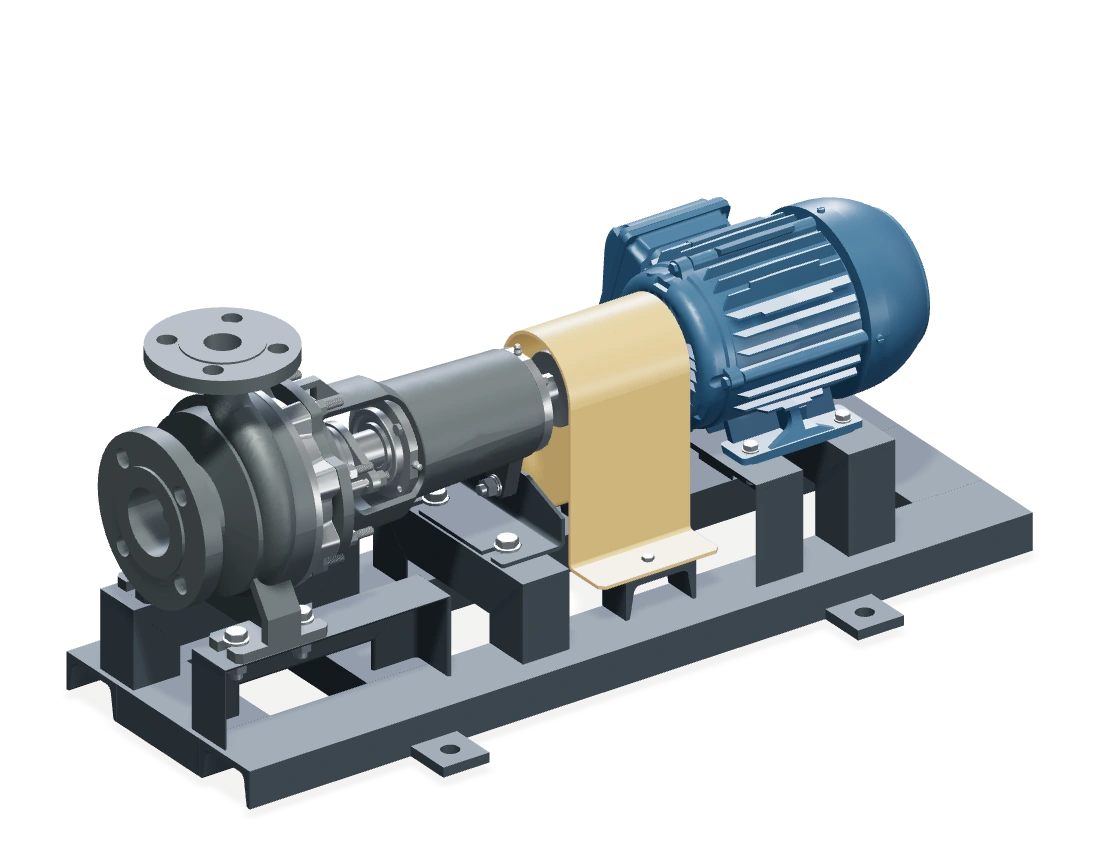
Engineering files become a coupling-inspection guide for the CP-200 pump. A second request creates a PDF manual from the same model and instructions. The yellow coupling guard is replaced with a stainless-steel version. An input above the machine types “Update the documentation.” As the documents appear, connecting lines carry pulses from the revised guard to the maintenance manual, parts list and service instructions in turn. Each arriving pulse highlights the affected content, advances the document to revision 03 and reveals a checkmark. The revised machine remains connected to all three updated documents beneath “Every output. One truth.” Illustrative documentation workflow with authored geometry states and document changes, not a live generation or automatic publication. Experts review source facts, visual actions and revisions; CP-200 is a demonstration identifier.

Supported by


Technical knowledge management
Manuals, procedures, parts lists, training, CAD models, videos and expert notes live in different folders and apps. TwinWorks reads them, finds what belongs together and links every block to its source.
Expert know-how lives in people’s heads. When they move on, it leaves with them.
Engineering releases revision C while the manual still describes revision A.
PDFs, binders, videos and drawings drift apart, and local copies multiply.
Audits need controlled instructions. Outdated pages add quality and review risk.
Technical documentation platform
Bring what you have. Experts approve what goes out.
Manuals, 3D models, schematics, narrated video, source code and your experts’ know-how.
Supported inputsTwinWorks reads each source, finds what belongs together and links every block to where it came from.
See the maintenance examplePublications, S1000D modules, 3D work instructions, training and translations, all from the same approved content. Plus an AI assistant that answers from it.
Digital work instructions
 AssistantProduct twin · Conveyor drive
Mount the drive motor.
Worked through 5 actions
Done. The drive motor is mounted.
Engineering change impact
TwinWorks finds the documents linked to the changed part and sends each suggested update to the right expert. Nothing is published until they approve it.

Where this is used4
AI assistant for maintenance
Ask a question.
Find answers in your documents.

Which tools do I need?
You’ll need:
MP-142 · Rev. C
§4.2 · Compressor X120–X140
Create each team’s format from the same source. When it changes, review and publish the linked updates.
Technical Publications
Structured manuals and publications keep revision history and source provenance together.
Explore technical publicationsTraining
Interactive training built from the same approved content as your manuals.
Explore technical training
Coupling inspection
CP200-MM · Rev 03
Start
Assembly
Interactive work instructions show every operator the same approved steps.
Explore assembly work instructions
CP200-07B
3Fit the coupling guard
Lower guard CP200-07B onto its seat.
3 of 3Finish
Quality Control
Optional photos, statuses, durations, and comments support quality review.
Explore quality control instructionsMaintenance
Technicians follow step-by-step guidance taken from the published procedure.
Explore maintenance instructions
 WARNINGIsolate the equipment first.
1Remove the coupling guard
1 of 3
WARNINGIsolate the equipment first.
1Remove the coupling guard
1 of 3

Industry
Aerospace documentation often demands rigorous structure, configuration control, and review. TwinWorks keeps modular content and the history of every approved revision, from the factory floor to the flight line.
View demo
Industry
Deliver accurate 3D documentation for assembling, calibrating, and servicing robotic systems, helping technicians follow each motion and connection with confidence.
View demo
Industry
Bring complex machinery and production workflows to life with interactive 3D documentation that supports training, clarifies complex tasks, and helps teams avoid costly mistakes.
View demoCommunity
Real projects with 3D instructions, design files and licences. Free to open.
Free tool · Explode & Animate
Drop in a STEP assembly. TwinWorks finds the parts and joints, animates the mechanism and lays out the exploded view. No account needed.
STEP or STP files up to 100 MB · Joint detection in beta
Then turn it into work instructions. Bring the same model into TwinWorks: the assistant moves the parts and drafts the steps for your review.
Why TwinWorks
Technical authoring and frontline execution are often managed separately. TwinWorks connects both to the engineering data and reference documents that define the product.
| Capability | Traditional CCMS | Work-instruction tool | Generic AI |

|
|---|---|---|---|---|
| Structured technical publications | ✓ | Limited | Limited | ✓ |
| Interactive work instructions | Limited | ✓ | Limited | ✓ |
| 3D and engineering inputs | Integration-heavy | Limited | Uncontrolled | ✓ STEP import beta |
| Shows the pages a change affects | Sometimes | Rarely | No | ✓ |
| Technical-document review and approval | ✓ | Sometimes | No | ✓ |
| Training from the same content | Limited | Sometimes | No | ✓ |
| Execution evidence and reports | Limited | ✓ | No | ✓ |
TwinWorks turns CAD, drawings and manuals into technical documentation and 3D work instructions, and keeps them current when the product changes. It brings 3D models, engineering data, and existing PDF or Word manuals into one documentation workspace. Teams use it to create manuals, interactive work instructions, training material, and execution reports; your experts edit, review, and approve every release.
Technical documentation software helps companies create, manage, and deliver the documents that describe how a product is built, operated, and maintained: manuals, work instructions, SOPs, troubleshooting guides, and training material. TwinWorks uses AI to prepare review-ready drafts from linked manuals and parsed engineering data. Experts edit, review, approve, version, and publish technical-document revisions.
TwinWorks imports existing PDF or Word manuals into editable drafts and uses them as reference sources. It reads engineering structures from QElectroTech, KiCad, 3DXML, and STEP or STP files; STEP import is in beta. For interactive 3D work instructions, it accepts OBJ, FBX, GLB, self-contained GLTF, and USDZ models. AI procedure drafts use reference PDFs. Imported models provide geometry and available assembly structure; authors create or review visual actions, with CAD-aware assistant proposals available in the editor. Procedures can also be written without a 3D model.
Yes. TwinWorks exports descriptive and procedural S1000D data modules next to its web and PDF publications. Tell us which S1000D issue and business rules (BREX) you work to, and we’ll confirm the setup with you.
TwinWorks keeps content in reusable modules with revision history and a record of where each part came from. When a source changes, it shows the pages that depend on it and flags broken references, outdated embedded procedures, and shared dependencies for expert review. When a procedure is carried out, it records step status, duration, comments, and optional photos.
TwinWorks is built for industrial manufacturers whose documentation is mission-critical, such as aerospace and defense, machinery and equipment, robotics, and energy. Its workflows center on structured content, expert review, and revision history.
A CCMS manages structured manuals; a work-instruction app runs procedures on the shop floor. TwinWorks connects both to engineering: manuals and 3D work instructions come from the same reviewed source, and a product change shows every document it touches. See the comparisons.
Published documentation opens in the TwinWorks web viewer in a browser, and manuals can also be published as PDF. AR guidance is a limited beta for prepared setups.
Yes. Education licenses are free for teaching, student projects and non-commercial research at universities, engineering schools and technical colleges. See how to apply.
Yes. Free includes 500 AI credits to start, public publishing and PDF export, for up to 4 products.
Free costs nothing and needs no credit card. Paid plans and their prices are in the app: sign up free to see them. Need a formal quote for your purchasing team? Ask us for one.
Yes. Starter, Business and credit packs are bought online: checkout takes your company name, address and VAT number, and every payment comes with an invoice. You can also pay by bank transfer against an invoice.

Bring your manual and your CAD model. Get instructions your team can follow, and keep them current as the product changes.
Free plan · No credit card · Not ready? Animate a model


